Your Webcam is Your New Handshake
Whether we like it or not, video calls are now a fundamental part of professional life. How you appear on camera can have a real impact on how you are perceived in a meeting. A dark, grainy, or poorly angled video feed can be distracting and make you look unprofessional. The good news is that you don't need expensive equipment to dramatically look good on Zoom.
You can achieve a 90% improvement by focusing on two key elements: lighting and camera angle. These simple video call tips will have you looking clearer and more professional on your very next call.
Tip 1: Face Your Light Source (The Golden Rule)
This is the single most important tip. If you only do one thing, do this.
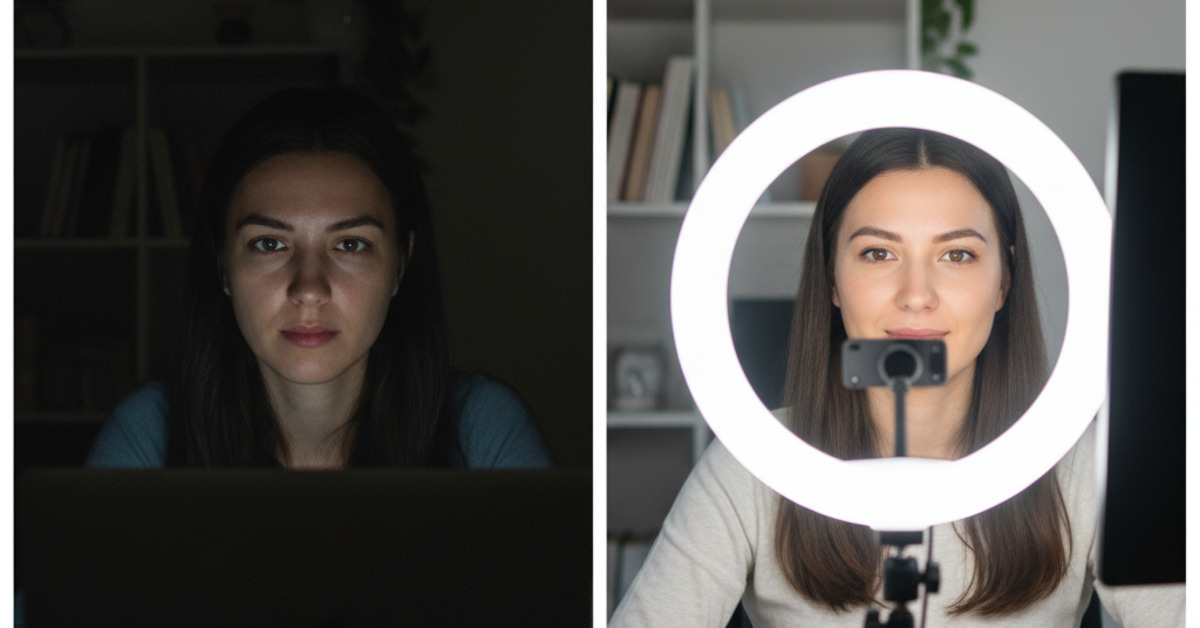
- The Problem: The most common mistake people make is sitting with a window or a bright lamp behind them. This backlighting forces your camera to expose for the bright light, turning you into a dark, unrecognizable silhouette.
- The Fix: Position yourself so that your primary light source is in front of you, shining on your face.
- Natural Light: The best and cheapest light source is a window. Set up your desk so you are facing the window. The soft, natural light will illuminate your face evenly.
- Artificial Light: If you don't have a good window, get a simple lamp and place it on your desk behind your laptop, shining toward you.
Tip 2: Invest in a Ring Light
For the best and most consistent results, a dedicated light source is a game-changer.
- What it is: A ring light is an LED light in the shape of a circle. It's designed to cast a soft, even light onto your face, minimizing harsh shadows and creating a flattering "catchlight" in your eyes.
- How to Use It: Position the ring light directly in front of you, with your webcam peeking through the center of the ring. You can buy affordable ring lights that clip directly onto your laptop or monitor. This is the easiest way to guarantee a good Zoom lighting setup, no matter what time of day it is or how dark your room is.
Tip 3: Get Your Camera to Eye Level
A bad camera angle is the second most common video call mistake.
- The Problem: Using your laptop's default camera while it's sitting on your desk forces it to look up at you from an unflattering angle.
- The Fix: You need to raise your camera to eye level. This creates a much more natural, conversational, and flattering perspective.
- The Free Method: Use a stack of books or a sturdy box to elevate your laptop until the camera is at the same height as your eyes.
- The Better Method: Get a laptop stand. This will raise your entire laptop. You will need to use an external keyboard and mouse with this setup, which is also better for your posture and ergonomics.
Tip 4: Tidy Up Your Background
A cluttered or distracting background can pull focus away from you.
- The Rule: Your background should be as simple and clean as possible.
- Good Options: A plain wall, a tidy bookshelf, or a simple piece of artwork are all great choices.
- What to Avoid: A messy room, a view of a high-traffic area in your house, or sitting with your back to an open door.
- To Blur or Not to Blur?: The "blur background" feature can be useful in a pinch, but a clean, real background always looks more professional.
Tip 5: Look at the Camera, Not the Screen
When you are speaking, try to look directly into the small green dot of your webcam.
- Why it Matters: While it feels more natural to look at the other people's faces on your screen, looking at the camera gives the impression that you are making eye contact with them. It creates a stronger sense of connection and engagement.
By implementing these simple professional video call techniques, you can ensure that your ideas—not your shadowy lighting or weird camera angle—are the focus of the conversation.